Categories

TGA Thumbnails for Windows

If you are looking for a solution for TGA on Vista and Windows7 both 32 and 64 bit check out FastPictureViewer WIC RAW Codec Pack.

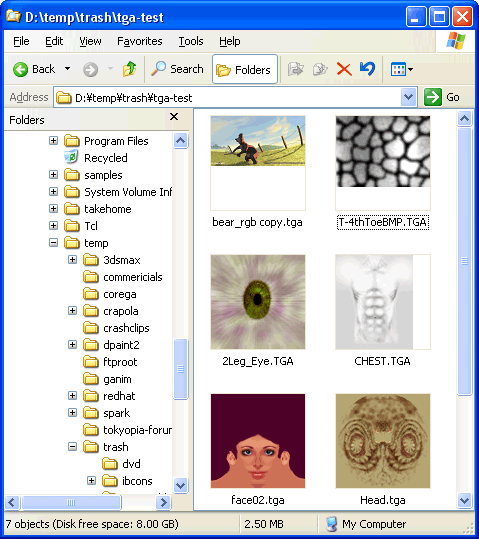
Can you figure out what’s different about this picture?

Look close…..The difference is you are seeing thumbnails for TGA files inside Windows Explorer!!!  That also means you can see them inside pretty much any file open / file save dialog.  Hooray!

Windows 2000 and XP provide thumbnails for .JPG, .GIF, .BMP, .AVI, .MPG and a few other formats.  What’s cool though is Windows 2000 and XP also provide an API for adding support for more formats.  So, I found an example, whipped out some old TGA code and threw this together.

Not too many *normal* people use the TGA format but in the video and computer game industry it’s pretty popular.  Probably because it’s supported by most graphics software and because it’s very simple to use.  You can read or write a basic TGA file in just a few lines of code.

Just in case you are not aware, the same function is available inside the normal Windows standard file open/save window so for example if you are in Maya selecting a texture file you can select by clicking on a thumbnail instead of having to remember the name of the file.
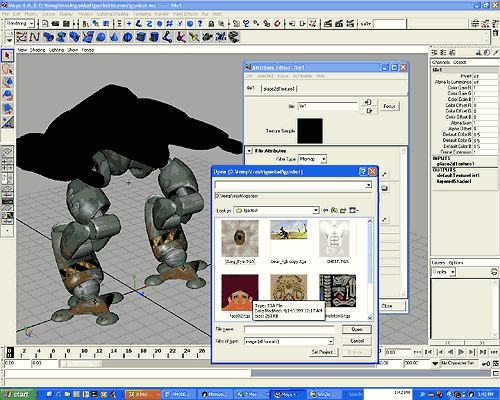
To do this, in the file open/save window you click the last icon on the right and pick "thumbnails" (1)
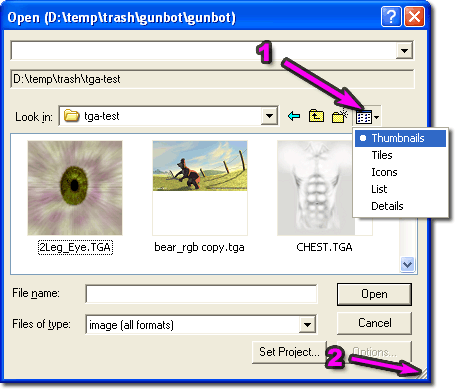
Also, just incase you didn’t notice you can resize the standard file open/save window (2) so that you can see more files at once.

Download:

You can download the installer by clicking the link below.

thumbplug_tga1.10.exe(268k)
[ for TGA (Targa) files ]

There is also a version for Softimage PIC files.

thumbplug_pic1.11.exe(309k)
[ for PIC (Softimage) files ]

And for Maya IFF files.

thumbplug_iff1.09.exe(314k)
[ for IFF (Maya) files ]

THERE IS NO WARRANTY HERE.  USE THIS AT YOUR OWN RISK!  THERE IS ALSO NO SUPPORT!

Notes:

The TGA(Targa) format supports many formats but most of them are pretty rare.  For example, TGA files can have their images stored in any direction, right to left, bottom to top, top to bottom, left to right.  They can also support 15 and 16 bit pixels.  But, in my personal experience, I’ve never seen a TGA file stored any way other than bottom to top + left to right.  I’ve also never personally used a 16 bit TGA file nor have I used or seen any of the other options.  Therefore, there is no support for those other formats in this plug in.  If you need support, see below

The PIC format also supports many formats.  This plugin currently only supports 24bit and 32bit files.

Version History:

TGA
v1.09 2003-02-02
  • first public release
v1.10 2004-08-15
  • attempted to fix issues with vertically flipped files
PIC
v1.11 2003-02-02
  • first public release
IFF
v1.09 2003-02-02
  • first public release

Source Code:

The source is provided under a FreeBSD style license.  If you do find a bug or add a feature I’d be happy to hear about it for if you find it really useful it would be nice to hear.

You can download the source code here

thumbplug_tga_src1.10.zip(28k)
[ for TGA (Targa) files ]

thumbplug_pic_src1.11.zip(25k)
[ for PIC (Softimage) files ]

If you download the source be sure to read the readme.  It’s important that you make a new CLSID or there will be conflicts.

142 comments to TGA Thumbnails for Windows

  • Zoinkity
    Great job!

    Oddly enough I happened across this immediately after looking over the api docs at Microsoft.  Great job.

    I did find one particular use for the 15/16bit targa format.  The 15bit format was used extensively in N64 games.  In that case, the unused 16th bit indicated alpha.  When set, the color is visible.  I’ve been meaning to add the support for this into GIMP, but there’s always about a million other things that need to be done.

    Excellent work again!

  • Kyle
    Vista

    I am wondering if this works with Windows Vista.  If it does…can you explain how I’m supposed to use it?  I have installed it, but cant figure out how to get my pics to open using it…i am a gamer who saved some screenshots, but have never worked with opening them before.  Thanks!

  • MayaIFF thumbnail

    Awesome! thanks dude!

  • sgt_why
    doesnt work for windows xp Pro (x64)

    This worked for me until I upgraded to new x64 windows … still installs fine, but doesnt work … is there any work arounds ?

  • Patrick
    convert to .jpg

    Is there anyway i can convert a .tga format file to a .jpg format. I wanted to post a screenshot onto my forum.

    Thanks 

  • PhilipPrescott
    wondering

    Is it then possible 2 make a script like yours that will allow windows 2 automatically take say frame 20 of an avi file and use that as the thumb? Also what files should i poke around 2 figure windows thumbnails out? I’d appreciate a line. thnx

  • JeffKraschinski
    Great plugin…

    but I’d love to see a little added functionality in adding support for getting BIG priviews using FILMSTRIP mode.

    Right now you do get little thumbnails, which is admittedly SWEET, but having it work with filmstrip mode where one could zoom in and scroll around like with JPEGS would be uber indeed…

  • mus
    THUMBNAIL IN?

    WEEL. IAM USING 3DS MAX9 AND I HAVE NO IDEA HOW TO USE THIS AND BRING IN MAX……

    I DOWNLOADED IT N INSTALLED IT BUT I COULDNT USE THEM IN MAX

  • Works in Vista Ultimate

    This is a nice little utility. Finding something like this is fantastic for someone who uses/makes alot of TGA files. Thanks alot for creating it… as a side note, this does work on Vista Ultimate (not sure about the other versions but I would think it would work for them as well).

  • Anon
    No workie on Windows XP 64-bit…

    Confirming what was stated above. Installs fine, but doesn’t work on 64-bit Windows.

    Sadness. Much of our stock library is in .PIC format.

    Guess I can look at the source…

  • anon
    Vista Business

    Can anyone tell me if this utility works properly with Vista Business ?

  • Robert
    Kudos

    This plugin saves heaps of time managing Targa files, wish ms would include support for a wider array of common picture file formats in their thumbnails.

    Works great on WinVista Ultimate x86/32bit, thanks a lot!

    p.s.: @some above comments: this PI is for displaying thumbnails in Windows Explorer – not for converting them or viewing them in full res, you’ll have to get a picture viewer/converter/editor or sth. for that (*hint*google*/hint*)

  • Segy
    thanks

    excellent and most useful thanks for sharing this

  • Wow!

    OMG, as an Unreal Engine mod developer, I tend to use a ton of TGAs, and I’ve off and on looked for soething like this for a long time. I LOVE IT.

  • flyby
    Update

    I emailed greggman about this and received his permission. I took the plug-in and integrated a few formats…

    PSD, DDS, TGA, XPM

    http://www.uproar-interactive.com/tools.html

    I have the artists at my company using it, so I may add some more formats upon request. Greg saved me tons of time, but I needed a bit more, so I’m offering it up to save more people time.

  • Chris
    nice, but could it show a bit more?

    Does this plugin control the pop-up text when you mouseover? For other image types such as PNG the resolution is show in this info. Some basic TGA info found in the header would be handy: resolution, TGA type/format. Thanks for a handy helper.

  • flyby
    Good idea

    Found the information, will work on it this weekend.

  • ice_trey
    indispensable!

    as a modmaker for Doom3, im working a lot with .tga,

    and with this great prog i dont have to fireup

    Pshop every time i just wanna view a .tga (which is, as you say, VERY common with games)

    Kudos and a beer to you! =)

  • Hiroshi
    ありがとうございます

    このようなソフトをずっと探していました。

  • Chrizz
    Not working for 64bit windows

    Confirm. but also the proffesional DDS thumbs of nvidia arnt working in win64

  • Spoondog
    64-bit support would be nice

    I’d just like to add one more request for Vista 64-bit support. I used to use this all the time but am on Vista 64-bit now where it doesn’t work. Hope you can find the time some day to include support for it!

  • Nick
    I second that!

    I got used to it before I installed 64-bit XP. It was so much nicer then. Oh the good old days!

  • Omar
    Vertical Centering

    Very useful tool, thanks!

    I just noticed a minor detail. In my Windows XP, for already supported formats (eg: PNG), thumbnails are vertically centered in the space their occupy. With your plug in the image is top aligned. So when browsing a folder containing both PNG and TGA the TGA files looks misplaced.

    It’s a minor detail though.

  • plantform
    1000 thanks!

    Both iff and tga thumbs were equally super useful! Everything working smoothly fast and easy!

  • aa
    instal?

    i know that to uninstall u can make regsrv32 /u name.dll, but how to make isntaller for other ppl?

  • Solution for Windows Xp x64 or Windows Vista x64

    Hi all,

    It seems to a great great problem for x64 users with TGA thumbnail…

    I found a expensive way to view TGA thumbnail in explorer..

    Basically there are two ways to do that…

    1st.

    If you are using… Windows XP/Vista x64 explorer.exe…

    Then you have to Install… DXSDK_Jun08.exe From here http://www.microsoft.com/downloads/details.aspx?FamilyID=519aae99-b701-4ca1-8495-39ddde9d7030&displaylang=en

    Approx Size of it is : 458 MB… which is too much for any of you…

    2nd.

    If you are not planning to download that much amount … here is a simple solution for you.. but if you use that you will loss some x64 capability because we are going to kill explorer.exe(x64) by Task Manager.. But still you can run any of your Installed x64 application in that…

    so here is simple process..

    Run the Task Manager > Kill Explorer.exe > Go To File > Paste > C:\\WINDOWS\\SysWOW64\\explorer.exe > Hit Enter..

    Now you are in x86 Structure any now you can able to view PSD Thumbnail if you were previously installed it and also DDS and TGA… in Explorer…

    I hope that will help you all…

  • TheNudge

    hi, any way of making a reader like this for RPF?

  • Cloud
    Good job

    Thank you!! Thank you!! Thank you!! Thank you!! Thank you!!

  • AuthorizedUser
    .tga thumbnail view(s)

    in windows 2000 pro without your plugin UNCOMPRESSED .tga’s were shown in thumbnail view I never checked to see if your plugin allowed compressed ‘.tga’s to be viewed on win2k I havent been able to get this plugin to work on Windows XP  32 or 64bit I use .tga’s exclusively for creating motocross madness 2 world maps I no longer use 32 bit windows XP x64 works better than any 32 bit XP install i have seen also a plugin for daylon levelller .ter files that shows heightmap in thumbnail view failed to work also on 64 bit xp mabey i have a necessasy service turned off?

    anyway love your stuff greg keep it up, randy

  • Andrew
    2d/3d artist

    Thanks! :D

  • Justin
    Vertical Centering

    I have just discovered this excellent Explorer plug-in (so MUCH better than having to use a whole different 3rd part application).

    However, I there is a problem with vertical centering. TGA images are pushed to the top of the Thumbnail and therefore they are not centered and do not align with all other format thumbnails. I was just about to point this out to the author when I realised that someone else has already made the same comment because they are experiencing the exact same issue.

    It would be great of this issue could be resolved.

    Thanks!

  • Zak

    Thanks a million, great plugin!!

  • MickBerg
    Installation fails

    My installation fails with the comment “tgatool.dll could not be registered”

    How can this be fixed?

    Thanks,

  • anon
    ty

    Since few are saying it, thanks for making this. Any chance you can make it work for filmstrip previews as well?

  • Works with Windows Vista Home Basic 32-bit

    hey, this works with Vista home basic 32 bit too!

    Thanks Greg! :)

  • Faris
    very handy

    saved me a lot of time after unpacking some game data files to quickly scroll through the thumbnails, as opposed to paging through an image viewer. thanks for this handy plugin

  • Janus
    Thanks for sharing

    :)

  • 64bituser
    Running in winx64

    You can use this shell extension on a folder by opening explorer in 32 bit mode by running this:

    %windir%\\SysWOW64\\explorer.exe /separate, /root, “c:\\your folder”

  • kevin
    great program

    very useful, thank you.

  • CodeMaster
    Great Program

    I love how you offer it to people without trying to make profit thats good person sure some people may have bugs . but i do not see anyone else coding it . great work greg

  • Bryan

    pls update this for windows 7! i tried it but it doesnt work:( thanks

  • -

    Great Program

    The one annoying aspect about this program is that it does not handle partial/complete transparency very well. Right now every pixel is displayed regardless of whether it is meant to be transparent or not. In other words each picture is displayed as though it has no transparency regardless of whether or not this is actually the case.

Leave a Reply


You can use these HTML tags

<a href="" title=""> <abbr title=""> <acronym title=""> <b> <blockquote cite=""> <cite> <code> <del datetime=""> <em> <i> <q cite=""> <strike> <strong>